Beginners guide
Goal
Welcome to the beginners guide. In this tutorial you will learn how to setup a working pyirk installation and create your first knowledge graph. In detail, we want to use Pyirk to encode some knowledge about trains, because it is an interesting topic but not too complicated.
Installation
The simplest way to get pyirk is from the Python Package Index (PyPi). Assuming you got a working python installation
of version 3.8 or higher, just run:
python -m pip install pyirk
This should get everything up and running.
The fundamentals
Firs we create a fresh python script called trains.py, which we will extend as the tutorial goes along.
If you should have any problems following the tutorial, you can find the complete script here.
To make things easier later on, we import pyirk under the alias p and tell pyirk under
which URI we want to store our knowledge:
1import pyirk as p
2
3# pyirk boilerplate
4__URI__ = "irk:/examples/0.2/trains"
5keymanager = p.KeyManager()
6p.register_mod(__URI__, keymanager)
7p.start_mod(__URI__)
For now, just see this as boilerplate code, the details can be found here.
The Train Item
Alright, so this is about trains. Based on our recently acquired knowledge about knowledge graphs we
now know that our train will be a Node in the graph, so we will create an Item for that.
Conveniently, pyirk saves us the hassle to manually instantiate an Item object and add some useful relations
like R1_has_label or R2_has_description with some meaningful date to it.
Instead, we use the function create_item() which directly allows us to provide some information about
this new item by making the statement that our new item is connected to the Literal
"train" in terms of the relation R1_has_label via a keyword argument.
In the same manner, we can also provide an detailed description (via R2_has_description):
1# create the train item
2I1001 = p.create_item(
3    R1__has_label="train",
4    R2__has_description="form of rail transport consisting of a series of connected vehicles",
5)
Let’s add some more hierarchy
As Wikidata says, trains are a mode of transport, which means we will encode this information by creating another item:
1# create the mode of transport item
2I1002 = p.create_item(
3    R1__has_label="mode of transport",
4    R2__has_description="different ways of transportation such as air, water, and land transport",
5)
Note
The actual variable names of the items (I1001 and I1002) do not matter that much, for this example we will just
assign them growing numbers.
However, to make pyirk aware that our train item is indeed a mode of transport, we have to add a relation, in this case
R4["is_instance_of"]:
1# add `is instance of` relation between them
2I1001.set_relation(p.R4["is instance of"], I1002["mode of transport"])
Hint
If you are wondering which relation number (like R4) will give you the required relation, have a look at
the most common ones in here.
The parts
We have our train and know that it is a mode of transportation. But what parts will we need to make one? A reasonable approach would be to let a train consist of a locomotive and at least one railroad car:
 1# create the locomotive and the railroad car
 2I1003 = p.create_item(
 3    R1__has_label="locomotive",
 4    R2__has_description="railway vehicle that provides the motive power for a train",
 5    R5__is_part_of=I1001["train"],
 6)
 7I1004 = p.create_item(
 8    R1__has_label="railroad car",
 9    R2__has_description="vehicle used for carrying cargo or passengers on rail transport system",
10    R5__is_part_of=I1001["train"],
11)
As we already have our trains item I1001 defined, we can directly add the relation R5["is_part_of"] in one
call instead of instantiating the item and then manually adding it like we did with I1002.
See what we did
So far so good. But how do we check if we defined everything correctly?
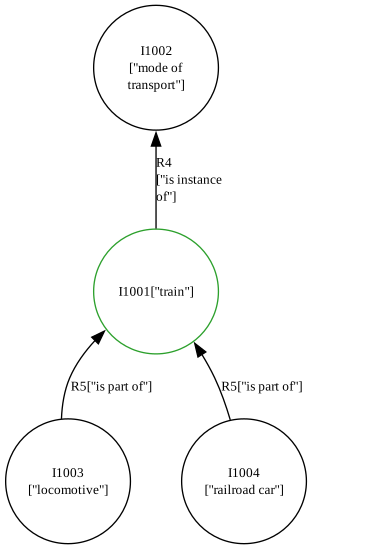
Pyirk offers an easy way to visualize a part of your graph by calling
visualize_entity() which
which will take the URI of your entity (in this case of the train item):
1# visualize the graph
2with open("trains.svg", "w") as f:
3    f.write(p.visualize_entity(I1001.uri))
The result should look like this: